

마공앱 (마법천자문 공식앱)


 Download
  Application Description
Magic Heaven Advisor Official App
Magic Thousand Character Official App
This is an Augmented Reality (AR) application designed for Magic Thousand Character Comics.
Recommended Specifications:
- For optimal AR (Augmented Reality) performance, use S8 or later models.
- Due to the high-performance requirements of AR, some recommended device subtypes may struggle to run the feature smoothly.
- Even with a compatible model, installation may fail if device storage is low or too many apps are already installed.
"Magical Thousand Character Comic Book with Magong App"
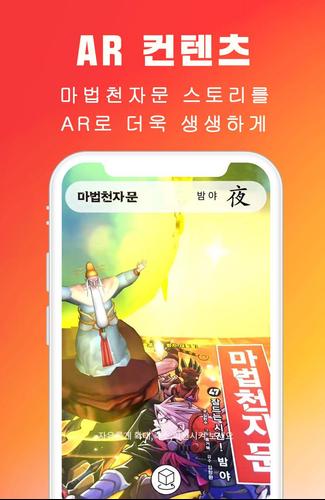
The Magong App (the official Magic Thousand Characters app) enhances your experience, making the comics more engaging and dynamic.
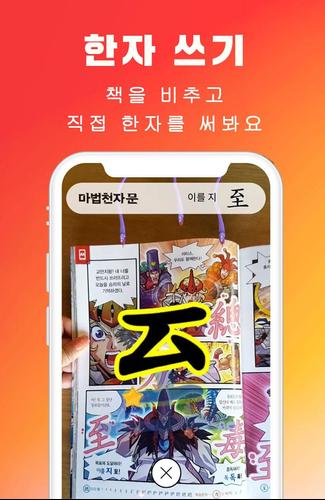
Simply activate the AR (Augmented Reality) feature by pointing your device at the book or card to bring 3D Chinese character magic to life.
Starting from Volume 54, you can collect cards and increase your leader level through promotion training activated via the book.
(For Volumes 1-53, only the 3D Chinese character magic feature is available.)
[ New Features Guide: Volume 54 and Later ]
● Leader Rating System
Step into the role of a true leader. Boost your abilities through promotion training and prove your skills in battle.
● Promotion Training Features
Participate in advanced training based on vocabulary from the Magic Thousand Character Book to earn cards and raise your leader level.
● Card Collection
Each book offers 3 types of character cards and 20 types of vocabulary cards from promotion training.
View your collected cards in the Encyclopedia; tap any card to see its unique animation.
● Enhancement System
Use magic stones to strengthen your acquired character cards and develop more powerful characters.
● Boss Battle
Join forces with your characters to defeat bosses from the Magic Thousand Characters universe and earn valuable rewards.
Rewards vary based on your contribution to defeating the boss.
[ AR Effect Enabled Pages ]
▶ Revised Edition Magic Thousand Characters, Volume 54 onward
- Book cover
- 20 interior pages
- Front of 20 Chinese character cards
▶ Revised Edition Magic Thousand Characters, Volumes 1-53
- Book cover
- 20 interior pages (marked with a red 'AR' symbol in the corner)
- Front of 20 Chinese character cards
▶ Original Edition Magic Thousand Characters, Volumes 1-44
- Book cover
- 20 interior pages (original editions do not include AR markers)
▶ Magic Thousand Character Text for Children Revised Edition, Volumes 1-10
- 212 included cards
● Experience unique Chinese character magic by scanning the Magic Thousand Character comic book and cards!
- An internet connection is required for Chinese character magic.
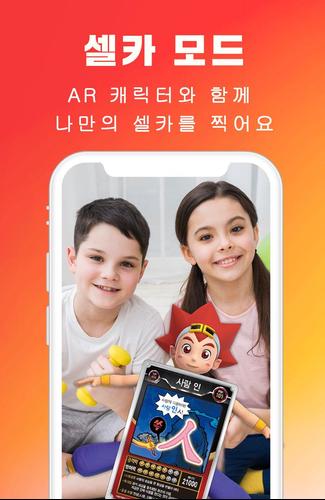
● Share your Chinese character magic via photos or videos, and access Magic Thousand Character News, YouTube, and Webtoon all in one place!
[ Frequently Asked Questions (FAQ) ]
▶ The app doesn’t recognize my book or card.
- If an image isn’t recognized, tap the yellow [+] icon in the center to retry.
- Ensure the image is clearly visible and aligned within the frame.
- Avoid glare from lights; use the app in areas with minimal reflection.
- Not all pages are AR-enabled. Refer to the list of pages where Chinese character magic appears.
▶ The app doesn’t recognize images or stops unexpectedly.
- If images aren’t recognized, tap the yellow [+] to scan again.
- The Magong app uses AR, which may cause the device to heat up during extended use.
Overloading may occur. Close the app for a while, then restart it.
▶ The first app launch takes a long time.
- Initial setup includes preparing to recognize Magic Thousand Character Book images, which may take some time.
- Older smartphones may experience slower performance.
▶ Do I need to write Chinese characters every time I scan the book?
- Enable ‘Skip after first character writing’ in settings to bypass this step after the first entry.
- However, skipping does not apply if a page contains two or more Chinese characters.
▶ Animation videos sometimes pause or stop.
- Animations stream online, so slow internet speeds may cause interruptions.
- Use a stable Wi-Fi connection for the best experience.
▶ Video recordings have low audio.
- Video capture records sound from your device's speaker. Increase the volume for clearer audio.
▶ Video recording stops on its own.
- Recordings are limited to 30 seconds and will end automatically.
- The front camera (selfie mode) records per AR model; recording stops if the model changes.
▶ Photos and videos I capture don’t appear in my gallery.
- On some devices, there may be a delay before media appears in the gallery (due to media scanning).
Restart your device to view the photos/videos in your gallery.
▶ Why do I need to grant permissions during installation?
- Normal app operation requires access to the camera, microphone, and storage.
- Denying permissions will prevent the app from functioning properly.
▶ I can’t leave comments on Plus Friends.
- Commenting on Plus Friends is a KakaoTalk feature.
- Tap ‘Open with App’ at the top right or the post image to open an external browser (Chrome, IE, etc.)
and launch KakaoTalk to comment.
- The ‘Open KakaoTalk App’ button may be restricted due to security settings.
● For other questions, contact us via the store review board or email. We’re happy to help!
- DN Soft Co., Ltd. [email protected]
Screenshot
 Reviews
Post Comments+
Latest Games
MORE+
Reviews
Post Comments+
Latest Games
MORE+
-
 謎解き脱出ゲーム 謎喰いエイリアンからの脱出
Word 丨 36.16MB
 Download
-
 Bully: Anniversary Edition
Role Playing 丨 11.30M
Download
-
 3D Tennis
Puzzle 丨 58.00M
Download
-
 Live Cricket TV HD: Streaming
Sports 丨 14.70M
Download
-
 Rush Rally 3
Sports 丨 148.42M
Download
-
 JoyPony
Simulation 丨 20.40M
Download
Similar recommendations
MORE+
Top News
MORE+




 Topics
MORE+
Topics
MORE+
- Your Guide to the Best News & Magazine Subscriptions
- Top Free Puzzle Games on Google Play
- Top Sports News and Score Apps
- Stylized Realistic Art Style Games for Android
- Fun Word Games to Play with Friends
- Top Action Games of 2024
- Must-Have Business Productivity Apps
- Relaxing Casual Games to Unwind With
Trending Games
MORE+
-
1

Xèng club -Game bai doi thuong-danh bai doi thuong26.60M
Are you on the hunt for a fun and rewarding card game? Look no further than Xèng Club - Game bai doi thuong - danh bai doi thuong! This legendary game is the hottest prize exchange card game around, offering free rewards exchange with no strings attached. With a nationwide support system in place, b
-
2

AiScore - Live Sports Scores34.3 MB
The fastest livescore app for NBA, MLB, Champions League, EPL & more.AiScore is your LIVESCORE EXPERT. Get more information, more statistics, and a completely new experience on your smartphone. With AiScore, you'll be informed faster than TV viewers!Experience in-depth coverage of basketball, baseba
-
3
![A Father’s Sins – Going to Hell [Ch. 7 Public] By Pixieblink](https://imgs.34wk.com/uploads/67/1719578270667eae9eb6a75.jpg)
A Father’s Sins – Going to Hell [Ch. 7 Public] By Pixieblink285.00M
Embark on a Captivating Journey with "A Father's Sins – Going to Hell"Prepare to be enthralled by a standalone companion game that takes you on a thrilling journey through alternative paths and captivating "what if" scenarios. Discover the captivating story of "A Father's Sins" in a standalone adven
-
4
Bầu cua thau nhôm5.80M
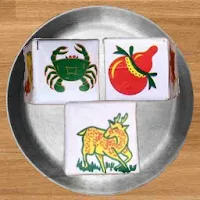
Dive into the vibrant world of traditional Tet gambling with the Bầu cua thau nhôm app. Experience the excitement of betting on symbols like gourd, crab, shrimp, fish, chicken, and deer, all from the comfort of your smartphone. Featuring stunning aluminum pot graphics and a highly realistic gamepla
-
5

Batguy Saw Trap22.7 MB
To help Batguy rescue Batlady from the clutches of the evil Jigtrap, we need to navigate through a series of challenging puzzles and traps. Here's a detailed guide to ensure Batguy can save Batlady safe and sound:Step 1: Enter Jigtrap's LairObjective: Find the entrance to Jigtrap's lair.Action: Sear
-
6
Guns GirlZ: Operation Gekkou413.00M
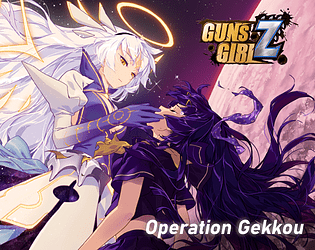
Operation Gekkou is a new Visual Novel app that brings the story of GGZ to life with enhanced English translations. Experience the thrilling storyline in a way that's more accessible to English speakers and discover improved text and translations. Join the Japanese servers to fully support the game
63.5 MB
Download406.3 MB
Download82.3 MB
Download194.5 MB
Download139.2 MB
Download27.0 MB
Download