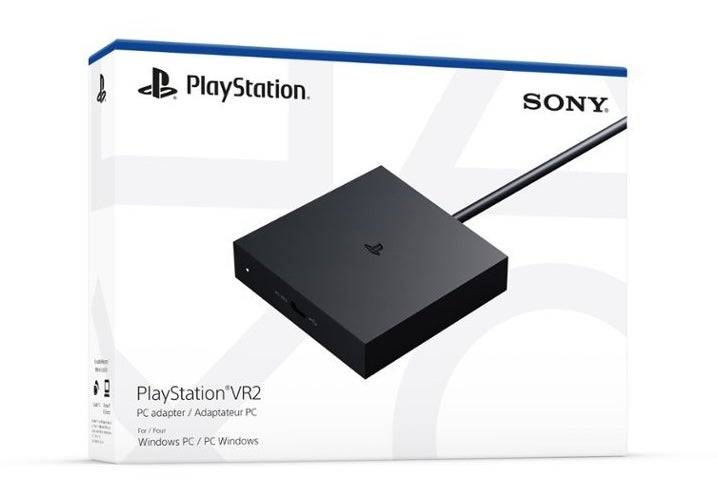
昨年秋にリリースされたSonyの60ドルのアダプターであるGaming PCでSteamVRゲームの膨大なライブラリを探索したいPlayStation VR2ユーザーの場合、ゲームチェンジャーでした。ただし、移行は期待するほど簡単ではありません。プラグアンドプレイマーケティングにもかかわらず、PS VR2は、特に特定のハードウェア要件と潜在的な構成の調整を考慮して、PCと完全に統合するために追加のセットアップが必要です。
アダプターでPCに接続する方法
セットアップの旅に着手する前に、必要なすべてのコンポーネントがあることを確認してください。 PS VR2は、アダプターを介して接続されている場合、ほとんどのSteamVRゲームと互換性がありますが、PCは特定の基準を満たす必要があります。 Bluetooth 4.0接続、Displayport 1.4ケーブル、AC電源コンセント、およびSteamアカウントにインストールされているPlayStation VR2とSteamVRアプリの両方が必要です。さらに、PS VR2に付属するセンスコントローラーには、USB-C充電ポートとケーブルが必要ですが、Sonyから50ドルのセンスコントローラー充電ステーションがあります。
必要なもの
まず、Sonyの公式PS VR2 PCアダプターの準備ページにアクセスして、ゲーミングPCがPlayStation VR2ヘッドセットと互換性があることを確認してください。これが必要なもののチェックリストです:
- PlayStation VR2ヘッドセット
- PlayStation VR2 PCアダプター(ACアダプターと男性USB 3.0タイプAケーブルが付属)
- displayport1.4ケーブル(個別に販売)
- PCの無料のUSB 3.0 Type-Aポート(Sonyは、拡張ケーブルまたは外部ハブの使用を勧めていますが、機能した外部ハブは機能することが知られています)
- PCのBluetooth4.0機能(組み込みまたは外部アダプター経由)
- SteamとSteamVRはPCにインストールされています
- SteamにインストールされたPlayStation VR2アプリ
接続方法:ステップバイステップの手順
必要なすべてのアイテムを収集したら、次の手順に従ってPS VR2をPCに接続します。
- SteamVRとPlayStation VR2アプリをインストールしていない場合は、まだお届けしていない場合はSteam Windowsクライアントをダウンロードしてインストールしてください。次に、 SteamVRアプリとPlayStation VR2アプリをSteam内にインストールします。
- PCのBluetoothをセットアップしてセンスコントローラーをペアリングします。PCのスタートメニューに移動し、設定> Bluetooth&Devicesに移動し、Bluetoothを「ON」に切り替えます。センスコントローラーをペアリングするには、PlayStationを押し続け、白色光が点滅するまで各コントローラーのボタンを作成します。 PCで、Bluetooth&Devicesセクションの[デバイスの追加]をクリックし、[Bluetooth]を選択し、PlayStation VR2 Sense Controller(L)と(R)の両方を接続します。 PCに組み込みのBluetooth 4.0がない場合は、Asus BT500のような互換性のあるアダプターの使用を検討してください。 Bluetooth無線が組み込まれたシステムで外部アダプターを使用している場合は、デバイスマネージャーの内部Bluetoothドライバーを無効にします。
- アダプターをセットアップしてPCに接続します。PSVR2アダプターをPCの無料USB 3.0 Type-Aポートに挿入します。 DisplayPort 1.4ケーブルを使用して、アダプターをGPUのDisplayPortスロットに接続します。 AC電源アダプターをコネクタのアダプターのDCに接続し、電気コンセントに接続します。アダプターのステータスインジケーターは、電源を入れたときに固体赤に変わる必要があります。最後に、Adapterの前面にあるUSB-Cポートを介してPlayStation VR2をアダプターに接続します。
- ハードウェアアクセラレーションのGPUスケジューリング(オプション)をオフにします: 40シリーズNVIDIA RTXカードのような新しいGPUの場合、安定したVRエクスペリエンスにはハードウェアアクセラレーションのGPUスケジューリングが必要になる場合があります。 [設定]> [システム]> [表示]>グラフィックスに移動し、[デフォルトのグラフィック設定]をクリックし、「ハードウェアアクセラレーションのGPUスケジューリング」スライダーをオフにします。その後、PCを再起動します。
- PlayStation VR2アプリとSteamVR:PlayStation VR2ヘッドセットのパワーを起動して、振動するまで中央のボタンを押し続けます。 SteamVRを起動し、デフォルトのOpenXRランタイムとして設定します。デスクトップでPlayStation VR2アプリを開き、Sense Controllersのファームウェアを更新し、プレイエリアやその他の設定を含むPS VR2ヘッドセットをセットアップします。画面およびヘッドセットの指示に従って、IPD、表示距離、ヘッドセットのフィットを調整します。セットアップが完了したら、SteamVRゲームに飛び込む準備ができました!
アダプターなしでPCに接続できますか?
現在、アダプターなしでPS VR2をPCに接続することは公式にはサポートされていません。ただし、 VRへのRoadに関するレポートによると、PlayStation VR2アプリがインストールされている場合、USB-CポートとVirtuallinkテクノロジーを備えた2018年頃の一部のGPUはPS VR2への直接接続を可能にする場合があります。この方法は、PCアダプターの必要性を回避しますが、普遍的に信頼できるソリューションではありません。
 最新のダウンロード
 Downlaod



 トップニュース